
 Back
Back4. Membership Signup Instructions
This guide will help you sign up for membership. If you have any questions or require further guidance, please email our Membership Secretary.
STEP 1:
Choose from one of the membership options and select 'Buy'.
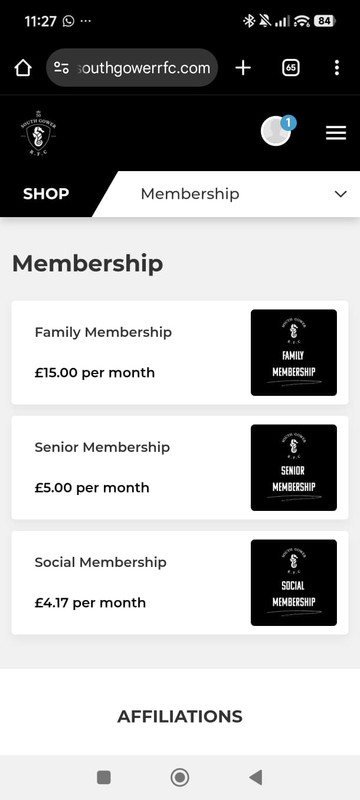
STEP 2: Login to your Pitchero account. If you don't have an account click 'Register' and follow the instructions.
If you need help signing up to Pitchero, please check out our Pitchero registration guide.
.jpg)
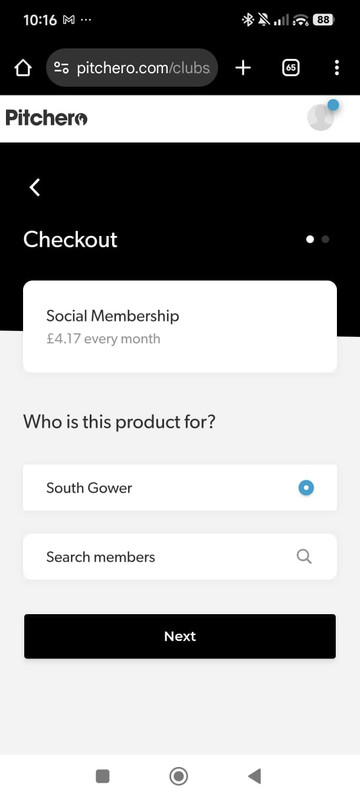
STEP 3: Select who the product is for and click 'Next'.
If you're paying for your child/children, choose them here.
If you can't see them select 'Search Members' and add them.
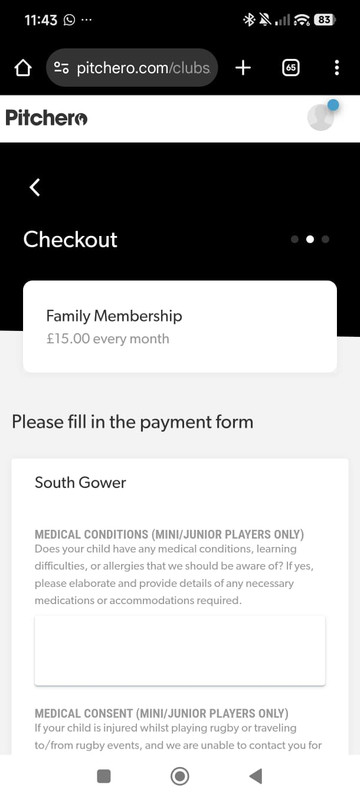
STEP 3a (Family Membership Only): If you've selected your child/children please add any medical conditions and update the medical/social media consent options on the next screen.
You should also separately notify your coaches of any medical conditions they should be aware of.
STEP 4: Select pay and fill out the Direct Debit mandate form on the GoCardless secure payment site.
.jpg)
STEP 5: You will receive an email from GoCardless confirming your membership order and initial payment date.
You will then receive a subsequent email from GoCardless when your payments go through.
Please note - only direct debit payments are allowed. If this is not possible, e.g. you do not have a bank account, please contact the Membership Secretary.
ADDITIONAL SUPPORT
If you have any issues signing up for Membership or need more guidance, please email our Membership Secretary.